
Manage private pricing offers for Amazon Bedrock with managed entitlements
Managing AI model access across dozens or hundreds of AWS accounts creates operational friction when each workload account must subscribe and accept AWS Marketplace Private Pricing Offers (MPPOs) individually. Amazon Bedrock with managed entitlements simplifies multi-account access to third-party AI models so you can subscribe once from a central account and distribute access across your organization.
In this post, we show you two ways to activate AWS Marketplace Private Pricing Offer (MPPO) entitlements in AWS License Manager. Use the lightweight script when you want a one-time, no-infrastructure fix for received licenses you already trust. Use the CDK automation when you want ongoing event-driven processing that verifies sellers, creates and activates distributed grants.
With AWS Marketplace Private Pricing Offers, you can negotiate custom rates for third-party models on Amazon Bedrock. After an eligible private offer is accepted, AWS Marketplace creates a license in AWS License Manager. In AWS Organizations with all features enabled, organization-level grants are auto-accepted but remain Disabled until you activate them.
Teams often manage this by checking the AWS License Manager console and activating grants manually. Manual checks work, but they add effort and are easy to miss. Until someone activates the grant, negotiated pricing does not apply. The same effort appears as teams adopt new models or renew terms.
The sample repository provides two paths:
Choose one of the following implementation paths. Use Path 1 for one-time activation without CDK. Use Path 2 for ongoing event-driven automation.
Use this path when you need one-time activation without deploying CDK. The script lists every received license in the management account, so use the dry run as your review gate before applying changes.
Use this path when you want new private pricing agreements handled automatically. The CDK stack listens for eligible AWS Marketplace agreement events, checks your seller allowlist, creates distributed grants, and retries activation when License Manager needs more time. The solution contains three components:
The following diagram shows the event-driven flow.
Figure 1: Sequence diagram showing AWS Marketplace sending a Purchase Agreement Created – Acceptor event to Amazon EventBridge, which invokes an AWS Lambda function. The function verifies the seller, discovers the received license, creates a distributed grant, requests activation with CreateGrantVersion(Status=ACTIVE), and writes the outcome to Amazon CloudWatch Logs.
Before you deploy this path, confirm these prerequisites:
Review any APPLY or MANUAL items before making changes. The bootstrap script can enable License Manager organization integration, License Manager trusted access, AWS Marketplace license-management trusted access, and required service-linked roles.
Review config/sellers.json. Configure your Organization ID, seller allow-list, notifications, and optional grant targets. By default, grants target the full organization. Use grantTargets to scope grants to selected OUs or AWS accounts.
Treat the seller allow-list as a security boundary. Verify each seller account ID against your accepted AWS Marketplace private offer or received License Manager license before seeding the table. Don’t add broad or unverified seller entries, because matching sellers can trigger grant creation and activation across your configured grant targets.
After deployment and seller seeding, the stack is ready to process eligible AWS Marketplace agreement events. Grant creation and activation happen only for verified sellers in the allowlist, and activation may be deferred until License Manager finishes processing the grant workflow.
Activation and billing visibility can take hours or days. After the event-driven workflow accepts and activates the grants, confirm the grant state in AWS License Manager, then validate covered Amazon Bedrock usage in AWS Cost Explorer after billing data appears. For a repeatable check, adapt the sample scripts/bedrock_discount_check.py utility to match your ISV Partner issuer and target linked account.
If you deployed this stack for testing, remove it to avoid the small ongoing Lambda and Amazon EventBridge charges:
“As an AI Care Partner supporting millions of clinician consults every week, Heidi Health relies on third-party foundation models at real scale. Private pricing on AWS Marketplace gives us a cost-effective and efficient way to manage that growth: we can granularly attribute usage and pricing across AWS accounts and organizational units, and automate grant management as we adopt new models. That lets our platform team scale cost governance without scaling manual work.”
— Marcus Lau, Head of Platform Engineering, Heidi Health
This post showed two ways to activate managed entitlements for Amazon Bedrock private pricing offers. Use the lightweight script for one-time activation of trusted received licenses, or deploy the CDK automation when you need ongoing event-driven processing for new AWS Marketplace agreements. Both approaches reduce manual effort and help negotiated pricing apply after distributed grants are activated.
To get started, try the code sample in your AWS management account to automate model subscriptions.
Related Stories
 AI News
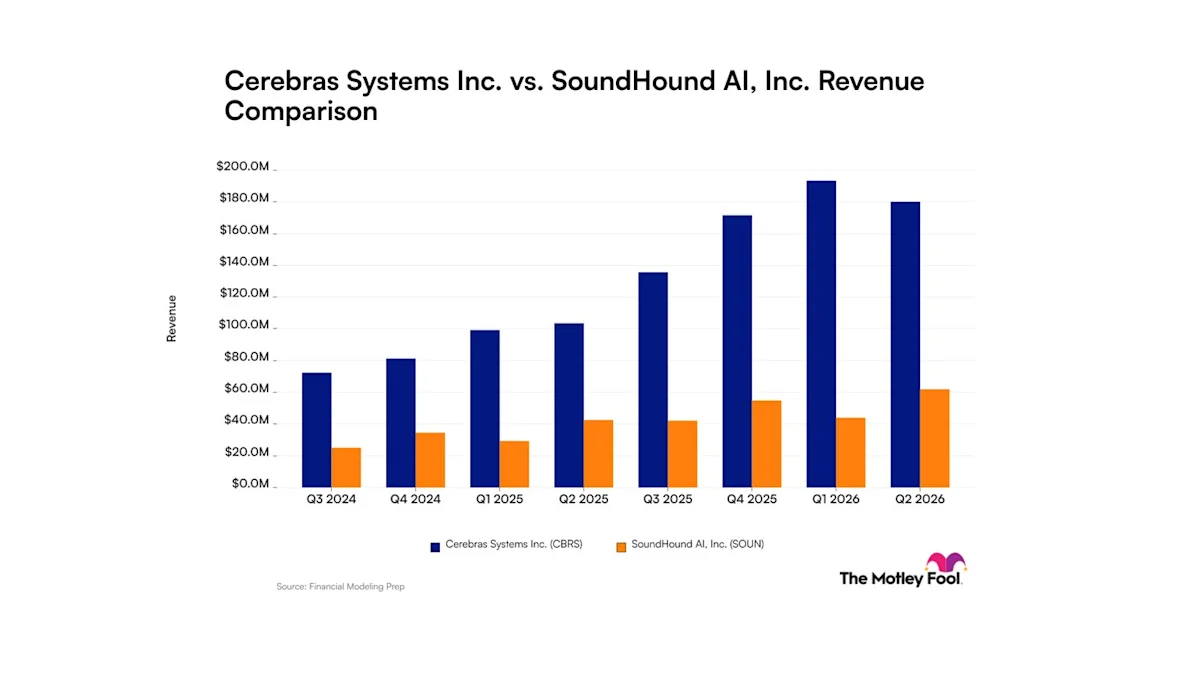
Cerebras Systems vs. SoundHound AI: Here's What Revenue Trends Tell Investors About These Artificial Intelligence Companies
32 minutes ago
 AI News
There’s a way to stop ChatGPT sending you to court for the wrong reasons
32 minutes ago
 AI News
Anthropic warns of AI ‘worms’ spreading across smart gadgets
1 hour ago
 AI News
How artificial neural networks build their own learning machinery
1 hour ago
 AI News
Far-right and Iran add to mix of terror threats UK faces
2 hours ago
 AI News
The Virginia Senate receives new research on artificial intelligence
2 hours ago
 AI News
AI kill switch: Can we really shut down artificial intelligence?
2 hours ago
 AI News
Coahoma encourages employees to access free Mississippi Artificial Intelligence Network training
3 hours ago